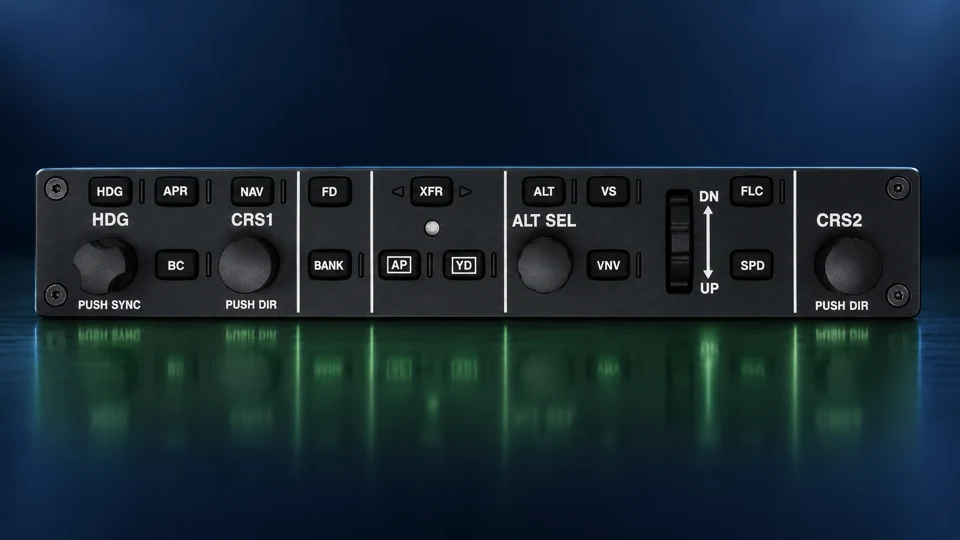
Understand the system behind a G1000 NXi fault before choosing the next check. TM-013 teaches architecture, cockpit controls and evidence-based troubleshooting for its stated Cessna 208B installation. Study online at your own pace with a handbook, interactive workbenches, fault cases and required work orders.
Individual online enrollment is open. Review the course scope and current price before purchasing. On-site instruction and practical evaluation are arranged separately.
Enroll in this online course
Choose a course to review its current content, price and signup options in the WWAOG Academy.
Study G1000 NXi architecture and cockpit controls for the stated Cessna 208B installation. Compare GDC 72 air-data indications, torque-sensor wiring to the GEA 71B, GMA 1360D audio selections and GMC flight-guidance modes. Use the 110-page Rev I handbook and interactive teaching models to complete 24 cases with 96 decisions and 12 required work orders, then pass the separate 48-question final at 80%.
Inside TM-013 Rev I: G1000 NXi systems and troubleshooting
TM-013 Rev I connects G1000 NXi cockpit observations to architecture, controls and data paths for the stated Cessna 208B installation. Use the 110-page handbook, work through 24 cases with 96 assessed decisions and complete 12 required work orders that record a prediction, supplied evidence, supported interpretations and reasoning. The separate 48-question final requires 80%; practical maintenance qualification is assessed separately.
Eight interactive systems workbenches
Explore cockpit control functions and connect avionics architecture, indications and data paths to the symptoms a technician needs to interpret.
Scenario practice
Complete 24 cases with 96 assessed decisions. The case bank requires 80% with no critical misses; controlled hints and page-specific Manual Help support review.
Required work orders
Complete all 12 work orders. Record an ungraded prediction before opening the supplied evidence, interpret both required fields and explain the reasoning.
Handbook and final
The 110-page Rev I handbook supports all 108 lab progress requirements. Pass the separate 48-question final at 80%; the certificate follows completion of the handbook, lab and final.
Is this pilot familiarization or maintenance training?
The focus is maintenance system understanding and fault-isolation reasoning. Review the TM-013 course page for the current content and enrollment details.
Does this cover every G1000 NXi installation?
No. The published course is focused on its stated Cessna 208B configuration. Aircraft, equipment and software differences must be considered separately.
How is the course delivered?
TM-013 enrollment is self-paced online through WWAOG Academy. Tailored on-site courses are also available by separate arrangement for your aircraft configuration, team and training goals.
What background is helpful before starting?
Basic aircraft electrical and avionics knowledge will help you discuss system relationships and fault evidence. If you are new to avionics or support a different installation, contact WWAOG with your role, aircraft and training goal before buying.
What should I check before purchasing TM-013?
Review the stated Cessna 208B configuration, published learning activities, current price and completion requirements on the specific Academy enrollment page. The course title does not establish applicability to every aircraft fitted with G1000 NXi.
Free course sample · TM-013
Learn the relationship. Test your reasoning.
Try a short teaching exercise from the subject of Garmin G1000 NXi Systems & Troubleshooting. No account needed.
About 2 minutes
01 · Understand
The GDC 72 air data computers calculate altitude, airspeed and vertical speed from the aircraft pressure inputs. Either air data computer can supply either primary flight display (PFD). Compare the selected GDC 72 output, the data arriving at each Garmin display unit (GDU), and the altitude shown on PFD1 and PFD2.
GDC 72 to GDU altitude display
Selected GDC 72 air data computer→
Altitude data at the GDU inputs→
PFD1 and PFD2 altitude indications
02 · Read the supplied record
In this fictional Cessna 208B G1000 NXi record, both PFDs are selected to ADC1, the GDC 72 No. 1 air data computer. Current altitude data is verified at both GDU input connections. PFD1 shows the altitude; PFD2 does not. Other PFD2 functions remain available.
Original public teaching example based on the course’s published scope. Supplied records and values are training data. Aircraft maintenance uses current applicable instructions; this sample does not record course completion.
Understand the source, path and display behind an avionics symptom
TM-013 Rev I connects G1000 NXi controls and named avionics to maintenance troubleshooting for the stated Cessna 208B installation. Trace GDC 72 air-data computer indications to the primary flight displays, compare torque-sensor wiring with the GEA 71B engine-interface unit, and explore GMA 1360D audio selections and GMC flight-guidance controls. Learn which terrain warnings TAWS INHB suppresses and which remain available. Complete 24 cases with 96 assessed decisions and 12 required work orders. The 110-page handbook, hints and page-specific Manual Help explain the systems and comparisons. The case bank requires 80% with no critical misses, and the separate 48-question final requires 80%. Interactive controls are teaching models; aircraft-specific test procedures remain governed by the applicable maintenance data.
System architecture and fault evidence
G1000 NXi training connects line-replaceable units, data paths and displayed indications. Learners examine how an observed symptom relates to the source of information, the route it takes and the equipment using it. The course emphasizes fault-isolation reasoning so a display indication is considered alongside other evidence before a component is identified as faulty.
Configuration and restoration
The program scope includes software loading, configuration control, option restoration and operational checks. These topics are considered together because replacing a unit is only part of a maintenance task. Training focuses on understanding the configuration involved and identifying the evidence needed to demonstrate restoration using the applicable maintenance instructions.
Learning outcomes
Trace GDC 72 air-data and GRS 79 attitude/heading indications to the flight displays
Compare torque-sensor wiring and GEA 71B engine-data acquisition
Distinguish GMA 1360D microphone selection, receiver monitoring and warning audio
Read flight-director guidance, AP engagement and yaw-damper engagement separately
Interpret TAWS INHB and document the tests needed to verify a repair
Choosing the right training scope
Identify the aircraft installation, learner avionics experience and expected line-maintenance responsibilities. G1000 NXi installations differ by platform and configuration; confirm that the selected course scope matches the equipment your technicians support.
WWAOG provides independent training. Course completion does not replace aircraft-specific maintenance data, employer authorization or applicable licensing requirements.
A maintenance learning guide to G1000 NXi symptoms, source–path–display reasoning, shared inputs and the evidence needed to support a fault-isolation decision.
Study the listed Caravan systems, older and EX engine-control rigging, G1000 avionics, inspection planning and structural assessment, then connect the findings in an integrated maintenance-diagnostics capstone. Review each course for the applicable engine, equipment and study scope.
Your aircraft. Your team. A course built around both.
WWAOG offers tailored on-site courses for operators, maintenance organizations and government teams. We can shape the course around your aircraft configuration, installed systems, technician experience and operational training goals.
Tell us what your team needs
Aircraft model and equipment configuration
Location, group size and technician experience
System topics and desired learning outcomes
Preferred dates and available training resources
We’ll agree the scope, delivery plan and quotation before scheduling. Tailored on-site training is arranged separately from individual online course enrollment.