
Caravan G1000 Communications & Audio Troubleshooting
Explore the named components, make a prediction, then connect the supplied result to the system. This workshop adds coached practice alongside the course handbook and assessed lab.
G1000 COM radios, microphone keying and audio outputs
Preparing a frequency, choosing a microphone radio, pressing push-to-talk (PTT) and hearing sound are different events. Follow the Caravan G1000 radio and audio connections, then predict three fictional records before revealing their observations.
Find the G1000 COM tuning and audio controls
Start with the three COM controls on the right display bezel. Tuning a frequency, making it active and adjusting received audio are three different actions. Select a numbered control to learn which action it performs; the photograph itself does not operate a radio.
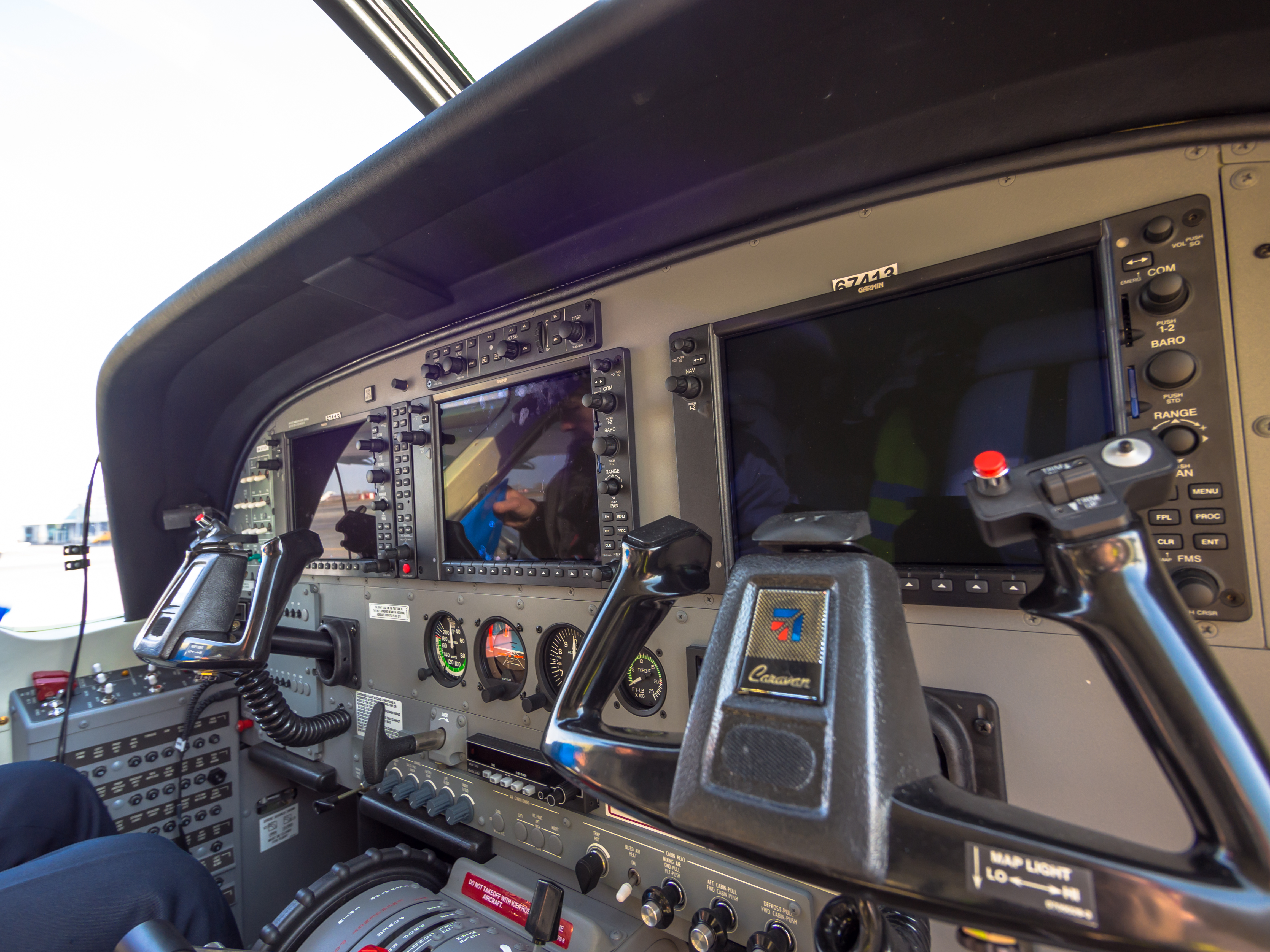
“Cessna Grand Caravan cockpit (8649554760).jpg” by Alex Polezhaev, via Wikimedia Commons and Flickr. CC BY 2.0. Photograph unchanged; interactive labels by WWAOG. The photograph and labeled photo view are available under CC BY 2.0. Assessment text remains separate. No photographer or manufacturer endorsement is implied.
Scroll across the photograph to inspect the panel, or open the full-size cockpit photograph ↗. The named buttons below also select every teaching point.
Choose a numbered item
Find it in the photograph, then read its action, purpose and connection to the rest of the system. You can also choose a named item in the list. Keyboard users can use Tab and Enter or Space.
This photograph shows a classic Garmin G1000 Caravan cockpit, not a verified NXi installation. It is a location guide, not proof of aircraft serial number, software version or installed radio/audio-panel part numbers. The dark screens do not establish a fault.
This guided photo activity explains the visible equipment. Selecting a label does not operate an aircraft control or record course completion. Continue with the system diagram and supplied fault record to practice troubleshooting.
Separate functional paths for frequency control, microphone/keying, transmitted radio-frequency (RF) delivery and selected receive/local audio. COM MIC also selects its associated receiver; an additional listen selection does not change the microphone destination.
Recorded state: before the supplied change
Green outlines identify components named in the selected exercise record; they do not indicate a healthy component.
Named connections and what each arrow means
- GDU active / standby tuning → GIA 1 / 2 COM transceiversTask sequence: Active frequency / selected-radio control
- Microphone and PTT input → GMA 1347 / 1360D audio routingInformation / signal: Separate speech content and PTT request
- GMA 1347 / 1360D audio routing → GIA 1 / 2 COM transceiversInformation / signal: COM MIC destination, audio and keying
- GIA 1 / 2 COM transceivers → Coaxial cable, VHF antenna and external stationInformation / signal: Selected transmitted RF
- Coaxial cable, VHF antenna and external station → GIA 1 / 2 COM transceiversInformation / signal: Incoming RF to identified receiver
- GIA 1 / 2 COM transceivers → GMA 1347 / 1360D audio routingInformation / signal: Receiver audio / local monitoring information
- GMA 1347 / 1360D audio routing → Headset and speaker outputsInformation / signal: Selected headset and speaker output routes
GDU active / standby tuning
Prepares a standby frequency and transfers it into the selected radio’s active field.
Supplied record: COM2 standby prepared
How it works with the rest
The Garmin display units (GDUs) present radio status and frequency selection. A standby entry does not become the active frequency until its transfer action. Tuning COM2 does not itself select COM2 for microphone transmission. The actual GMA COM MIC selection and the active frequency of that chosen transmitter must remain visible together.
What the evidence must show
Name which radio is being tuned, which field is edited and which radio the microphone currently selects.
Selected: GDU active / standby tuning
Follow the change through the system.
Fictional powered G1000/GMA record: the actual COM1 MIC key is selected, so COM1 reception is also selected. COM2 has a prepared standby frequency; both radios and the complete intended microphone/keying/RF paths are supplied as available. The pending action transfers COM2 standby to active, then observes a PTT request without changing COM MIC.
Before the recorded change
COM MIC destination: COM1. COM1 receiver: selected with COM1 MIC. COM2 standby: prepared. Both radios and intended paths: supplied available. COM2 frequency transfer is pending; microphone selection will remain unchanged.
Next observation
Choose your prediction before revealing the supplied result.
Reference: Cessna D2078 Revision 42, 23-10-00 pp. 1 and 501–502, April 1, 2019; 23-51-00 pp. 4–6, October 20, 2022; supplied PDF pp. 835, 843–844 and 907–909. The GMA control tables identify COM MIC as selecting its associated receiver as well as the transmitter.
Course applicability and study references
Identified Cessna 208/208B G1000 GIA 63W/64W and GMA 1347/1360D installations in supplied D2078 Revision 42. The source distinguishes software up to v2499.03 from v2499.08 and on and the installed audio-panel arrangements. Each fictional record states the applicable selection and complete conditions. No radio transmission, RF performance or physical aircraft procedure is performed here.
- Dual GIA radio and antenna roles
Cessna D2078 Revision 42, 23-10-00 p. 1, April 1, 2019; supplied PDF p. 835. Identifies GIA 63W/64W COM1/COM2, corresponding coax/antennas, PTT and frequency/status functions.
- Installed GMA selections and speaker behavior
23-51-00 pp. 1 and 4–6, October 20, 2022; supplied PDF pp. 904 and 907–909. Distinguishes installed panel/software branches, COM receive and COM MIC selection, associated receiver auto-selection and PTT speaker muting.
- Separate local and external observations
23-10-00 pp. 501–502 and 23-51-00 p. 104 in the supplied manual; accepted TM-026A Rev C. Named operational comparisons preserve crew position, microphone, PTT, selected radio and actual transmit/receive speech observations.
Original learning diagrams and supplied training records explain the stated relationships. Current aircraft-effective instructions and authorization govern actual maintenance.