
King Air Fusion Flight Guidance & Troubleshooting
Explore the named components, make a prediction, then connect the supplied result to the system. This workshop adds coached practice alongside the course handbook and assessed lab.
Separate guidance, engagement and returned evidence
A received request, a computed command, an engaged control and a returning monitor signal establish different parts of the Fusion flight-guidance system. Explore the functional groups, then predict and interpret three supplied records. These exercises supplement the course handbook and assessed lab.
Find the Fusion flight-guidance controls and PFD annunciations
Locate the Flight Guidance Panel (FGP) above the displays before tracing its requests to the Flight Guidance Computers (FGCs). Selecting a photo label explains a control; it does not operate the aircraft or simulate mode engagement.
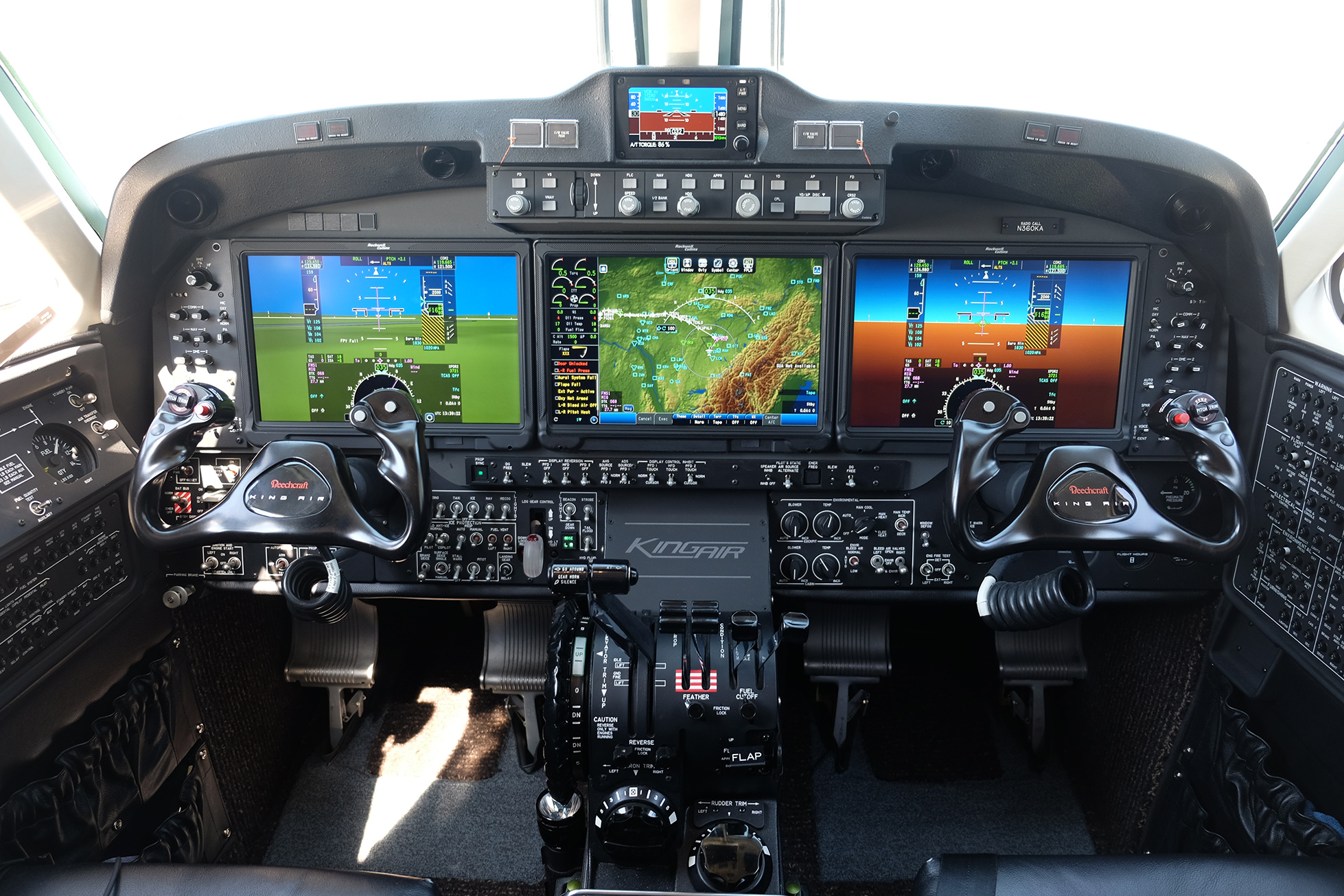
Collins Pro Line Fusion.jpg by Universe59, CC BY-SA 4.0. Photograph unchanged; interactive labels by WWAOG. Photograph and labeled view: CC BY-SA 4.0; assessment text remains separate.
Scroll across the photograph to inspect the panel, or open the full-size cockpit photograph ↗. The named buttons below also select every teaching point.
Choose a numbered item
Find it in the photograph, then read its action, purpose and connection to the rest of the system. You can also choose a named item in the list. Keyboard users can use Tab and Enter or Space.
King Air 360 cockpit example. This photograph is not proof of the course's B300/B300C May 2018 software or every King Air 350/200 installation. The primer explains the visible controls whose functions are supported by the supplied flight-guidance chapter; 360-specific autothrottle and pressurization features are outside this lesson.
This guided photo activity explains the visible equipment. Selecting a label does not operate an aircraft control or record course completion. Continue with the system diagram and supplied fault record to practice troubleshooting.
Functional groups distinguish paired drive, separate FGP clutch engagement, trim feedback and disconnect warning. Task links pair observations rather than define wiring. One actuation block groups its motor, mount, capstan and cables; each FGC and each named DCU feed still requires its own evidence.
Recorded state: before the supplied change
Green outlines identify components named in the selected exercise record; they do not indicate a healthy component.
Named connections and what each arrow means
- FGP and manual-trim requests → Two FGC-3000 computersInformation / signal: Received panel requests and manual-trim switch inputs
- Two FGC-3000 computers → Servo, mount and control cablesInformation / signal: Paired servo motor drive
- FGP clutch and disconnect paths → Servo, mount and control cablesElectrical power: Separate AP/YD clutch-engage circuitry
- Two FGC-3000 computers → Trim motion and two rate returnsInformation / signal: Pitch-trim arm and command logic
- Trim motion and two rate returns → Two FGC-3000 computersInformation / signal: Rate feedback to monitor circuits in both computers
- FGP clutch and disconnect paths → DCU feeds and disconnect auralTask sequence: Compare actual disconnect with the separately supplied aural-test record
FGP and manual-trim requests
Supplies crew mode and engagement requests, with separate yoke-switch inputs for manual pitch trim.
Supplied record: AP request received
How it works with the rest
The Flight Guidance Panel (FGP-3000) provides mode, reference, coupling and autopilot/yaw-damper requests. Its received LEFT and RIGHT inputs can be compared at the Flight Guidance Computers (FGCs). Manual pitch-trim switch signals from the yokes also connect to both FGCs. In the named manual-trim test, an individual switch half alone produces no motion; both halves provide the complete directional request. A received request does not measure downstream engagement or surface movement.
What the evidence must show
Name the selected control, received input and operating condition. Keep a panel request, a displayed mode and a physical response as separate observations.
Selected: FGP and manual-trim requests
Follow the change through the system.
Fictional aileron-task record: the complete named On Ground setup, valid inputs, resolved diagnostic prerequisites and operation of both FGCs are supplied. The wheel moved freely before engagement. YD and AP requests are received, and the paired servo drive is available. The FGP clutch-engage path is explicitly unavailable; the motor and cable paths have no other supplied defect. Predict the engagement observation without assigning an internal component cause.
Before the recorded change
AP request: received. Both FGCs and paired drive: supplied. FGP clutch-engage path: unavailable. Wheel before engagement: free. Engaged wheel observation: hidden.
Next observation
Choose your prediction before revealing the supplied result.
Reference: Textron 434-590169-0009, B300/B300C Fusion Maintenance Manual, May 1, 2018: 22-10-00 pp. 1–2; 22-10-03 p. 501; 22-10-07 pp. 501–502 and 601. Supplied source-pages.json packet pp. 5–6, 23 and 30–32.
Course applicability and study references
B300/B300C Fusion flight guidance in supplied Textron manual 434-590169-0009, Chapter 22, May 1, 2018 study edition. Identify the installed FGC/FGP, servo/mount, software, serial configuration and modifications for aircraft work. The challenges supply fictional observations under the complete named task setup; they do not reproduce an aircraft procedure, simulate automatic monitor cutout or provide maintenance release.
- Fusion scope and architecture
Supplied 434-590169-0009 Chapter 22, B300/B300C Fusion, May 1, 2018: 22-10-00 pp. 1–2, packet pp. 5–6. Two FGCs, differential servo drive, FGP functions, capstan/cable relationship and trim rate feedback to both monitors.
- FGP request and clutch boundaries
22-10-03 pp. 501–503, packet pp. 23–25; 22-10-07 pp. 501–502 and 601, packet pp. 30–32. Received requests, separate clutch circuitry, paired-computer prerequisites and physical response.
- Manual trim and received returns
22-10-01 p. 509, packet p. 20, manual-trim section only; 22-10-29 p. 601, packet p. 72; rate-monitor architecture in 22-10-00 p. 2, packet p. 6. Individual-half no motion, complete request, tab/wheel direction and both FGC monitor returns.
- Dedicated disconnect aural comparison
22-10-25 pp. 501–502, packet pp. 65–66. Intentional all-four-DCU-feed silence, then four separate restored-feed warning comparisons. The exercise supplies the first and DCU 1-only records without implying the other three passed.
Original learning diagrams and supplied training records explain the stated relationships. Current aircraft-effective instructions and authorization govern actual maintenance.