
Caravan GFC 700 Autopilot & Troubleshooting
Explore the named components, make a prediction, then connect the supplied result to the system. This workshop adds coached practice alongside the course handbook and assessed lab.
Connect GFC 700 guidance to mechanical response
A selected heading, flight-director command, engaged clutch and moving control are different events. Explore the components that connect them, then predict three supplied ground-test records before comparing the observations.
Find the GFC 700 controls before following a flight-guidance command
Start with the named buttons and knobs. A heading or altitude setting is a target; the flight director calculates guidance; the autopilot adds automatic control movement when engaged. Explore the six visible controls, then follow the named system diagram before working through the supplied fault records.
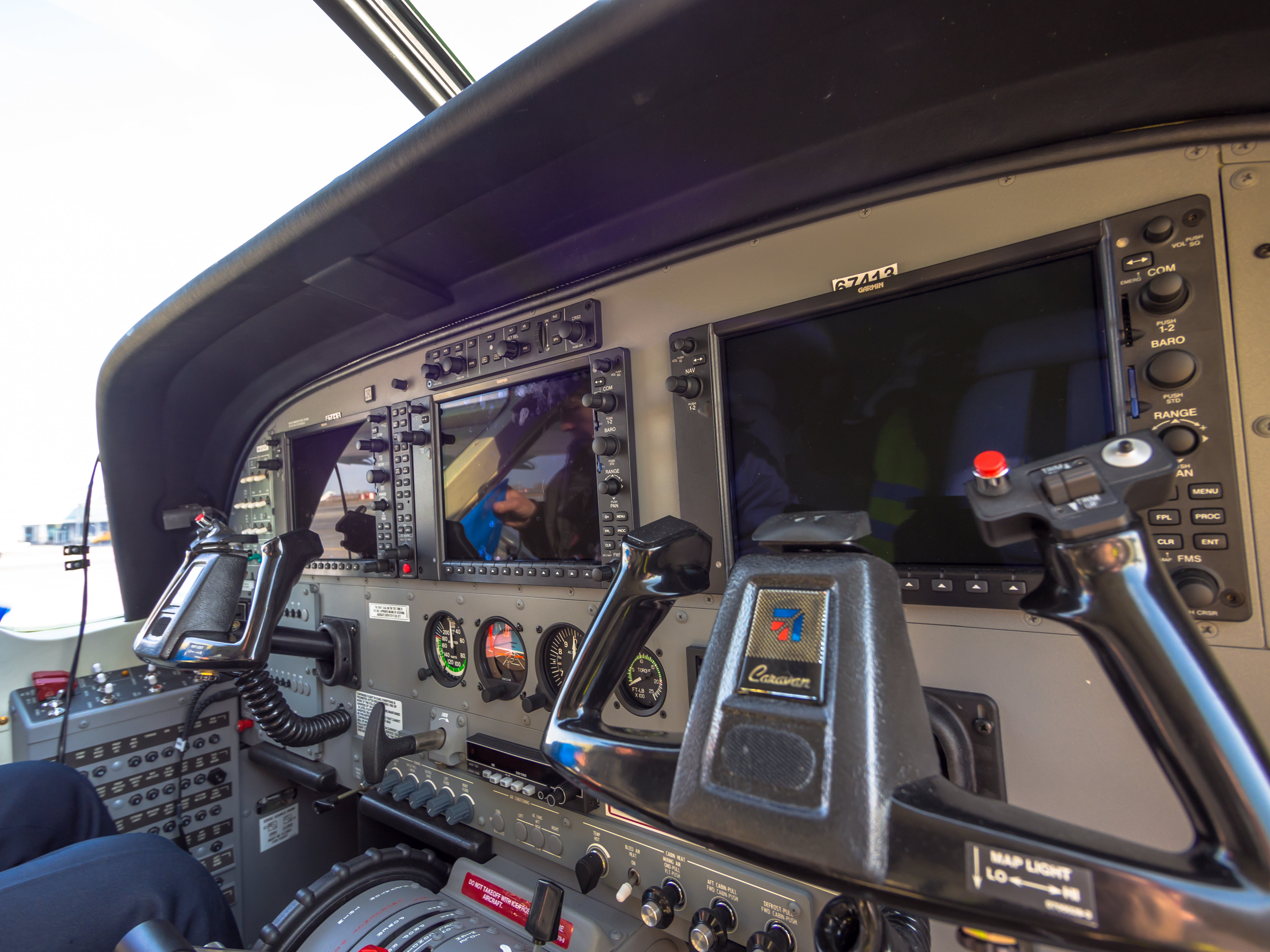
Enlarged GMC 710 mode-controller controls
“Cessna Grand Caravan cockpit (8649554760).jpg” by Alex Polezhaev, via Wikimedia Commons and Flickr. CC BY 2.0. Photograph unchanged; interactive labels and enlarged viewport by WWAOG. The photograph and labeled photo view are available under CC BY 2.0. Assessment text remains separate. No photographer or manufacturer endorsement is implied.
Scroll across the photograph to inspect the panel, or open the full-size cockpit photograph ↗. The named buttons below also select every teaching point.
Choose a numbered item
Find it in the photograph, then read its action, purpose and connection to the rest of the system. You can also choose a named item in the list. Keyboard users can use Tab and Enter or Space.
From a mode selection to guidance and control movement
Original functional diagram: the GIAs send guidance to the PFDs and command data to the servos on separate branches. This is not a wiring diagram, installation drawing or cockpit operating checklist.
GMC 710 — make the selection
The visible buttons choose a flight-guidance mode. The heading and altitude knobs set references. A selected number is a target, not a report of aircraft movement.
GIA 1 and GIA 2 — calculate guidance
The two integrated avionics units use the chosen mode plus air-data, attitude and navigation information to calculate flight-director commands. They are separate computers, not the visible mode controller.
GDU/PFD — show the command
The primary flight displays show command bars and armed/active modes. This display branch tells the pilot what guidance is being given. It is separate from the servo-command branch; the screen does not pull a control cable.
GSA servos and GSM mounts — apply the command
When AP is engaged and its requirements are met, GSA 80 roll and GSA 81 pitch servos provide force. The installed GSM 85/85A or GSM 86 mounts pass servo output through their capstans into the control linkages.
Cables and control surfaces — produce the response
The mechanical linkages move the aircraft controls. In the prescribed ground check, compare the selected heading, green HDG indication and actual control-wheel response. FD guidance with AP disengaged does not establish automatic movement.
Expected normal response: With AP disengaged, turning HDG changes the selected-heading bug; selecting FD and HDG can display green HDG and flight-director command bars for hand flying. Those indications do not establish automatic control movement. In ALT hold, turning ALT SEL changes the selected-altitude target while the active altitude-hold reference remains unchanged.
Study reference: Cessna Model 208 MM D2078, supplied Revision 42, 22-12-00 pp.1–2, 502 (actual PDF 772–773, 795); Garmin 190-00749-00 Rev. B pp.348, 350, 357, 371.
This is a real classic Garmin G1000 Caravan cockpit, not a verified NXi installation. The GMC 710 mode controller is above the center multifunction display (MFD). Match the installed equipment, software and applicable manual before a maintenance check. The dark displays do not establish a fault.
This guided photo activity explains the visible equipment. Selecting a label does not operate an aircraft control or record course completion. Continue with the system diagram and supplied fault record to practice troubleshooting.
Functional request, computation and actuation relationships. A flight-director display branch is separate from the servo/mechanical branch. Wheel-mounted CWS and disconnect inputs are distinct from GMC mode selection; arrows do not assign unprovided wiring.
Recorded state: before the supplied change
Green outlines identify components named in the selected exercise record; they do not indicate a healthy component.
Named connections and what each arrow means
- GMC 710 and wheel controls → GIA 63W/64W integrated avionics unitsTask sequence: Mode/reference request through PFD interface
- Attitude, air-data and NAV inputs → GIA 63W/64W integrated avionics unitsInformation / signal: Required measured guidance inputs
- Attitude, air-data and NAV inputs → GSA 80/81 servo actuators and clutchesInformation / signal: Described attitude information
- GIA 63W/64W integrated avionics units → PFD command bars and modesInformation / signal: FD command bars and mode state
- GIA 63W/64W integrated avionics units → GSA 80/81 servo actuators and clutchesInformation / signal: Automatic-control command data
- GMC 710 and wheel controls → GSA 80/81 servo actuators and clutchesTask sequence: Distinct CWS/disconnect/trim-control functions
- GSA 80/81 servo actuators and clutches → GSM servo gearbox mount, capstan and cablesPhysical relationship: Engaged actuator torque through installed mount
GMC 710 and wheel controls
Requests modes and references, with separate wheel switches for CWS, disconnect and manual trim.
Supplied record: HDG active; bug change pending
How it works with the rest
The GMC supplies crew selections through the PFD interface; it does not perform the GIA mode computation. Control wheel steering (CWS) temporarily releases the affected autopilot clutches in the named check. AP DISC disengages the autopilot. The two-part manual electric trim switch has its own arm/command functions. Controls sharing an aircraft objective still have different expected responses.
What the evidence must show
Name the actual control, selected mode and held/released state. Do not treat CWS as an AP DISC command.
Selected: GMC 710 and wheel controls
Follow the change through the system.
Fictional GFC 700 record: the four-servo installation has completed its stated preflight preparation; both GIA computations and required attitude, air-data and navigation inputs are supplied as available. The flight director is selected with HDG mode active, a green HDG annunciation and a valid heading reference. AP is not selected. Predict what changing the selected heading can show without automatic coupling.
Before the recorded change
FD selected with HDG mode active (green HDG); required inputs and paired computation available. AP disengaged. A valid heading-reference change is supplied. No automatic servo or control movement is supplied.
Next observation
Choose your prediction before revealing the supplied result.
Reference: Cessna D2078 Revision 42, 22-12-00 pp. 1–2, April 1, 2019; supplied PDF pp. 772–773. FD independence and separate servo actuation; 22-12-00 p. 502, supplied PDF p. 795, HDG selection/green annunciation.
Course applicability and study references
The identified Cessna 208/208B GFC 700 four-servo installation with yaw damper, GIA 63W/64W, GSA 80/81 and its installed GSM mount branch. The supplied general chapter identifies GFC 700 on 20800500 and on and 208B2000 and on; installed equipment and modifications determine applicability. Fictional ground-test records assume the complete named setup. They do not model aircraft flight dynamics or authorize physical control movement.
- Distributed GFC 700 functions
Cessna D2078 Revision 42, 22-12-00 pp. 1–2, April 1, 2019; supplied PDF pp. 772–773. GMC selection, paired GIA computation, independent FD operation, GSA roles and GSM mechanical transmission.
- Named CWS ground response
22-12-00 pp. 501–503, April 1, 2019; supplied PDF pp. 794–796. The held-CWS check retains YD and release restores green AP. The supplement uses that explicit test rather than reconstructing other operating states.
- Installed actuator and mount branch
22-12-05, 22-12-10, 22-12-15 and 22-12-20 identify distinct roll, pitch, yaw and pitch-trim work. Installed GSM 85/85A versus GSM 86 and axis select the physical task; no force or adjustment criterion is transferred between them.
Original learning diagrams and supplied training records explain the stated relationships. Current aircraft-effective instructions and authorization govern actual maintenance.